







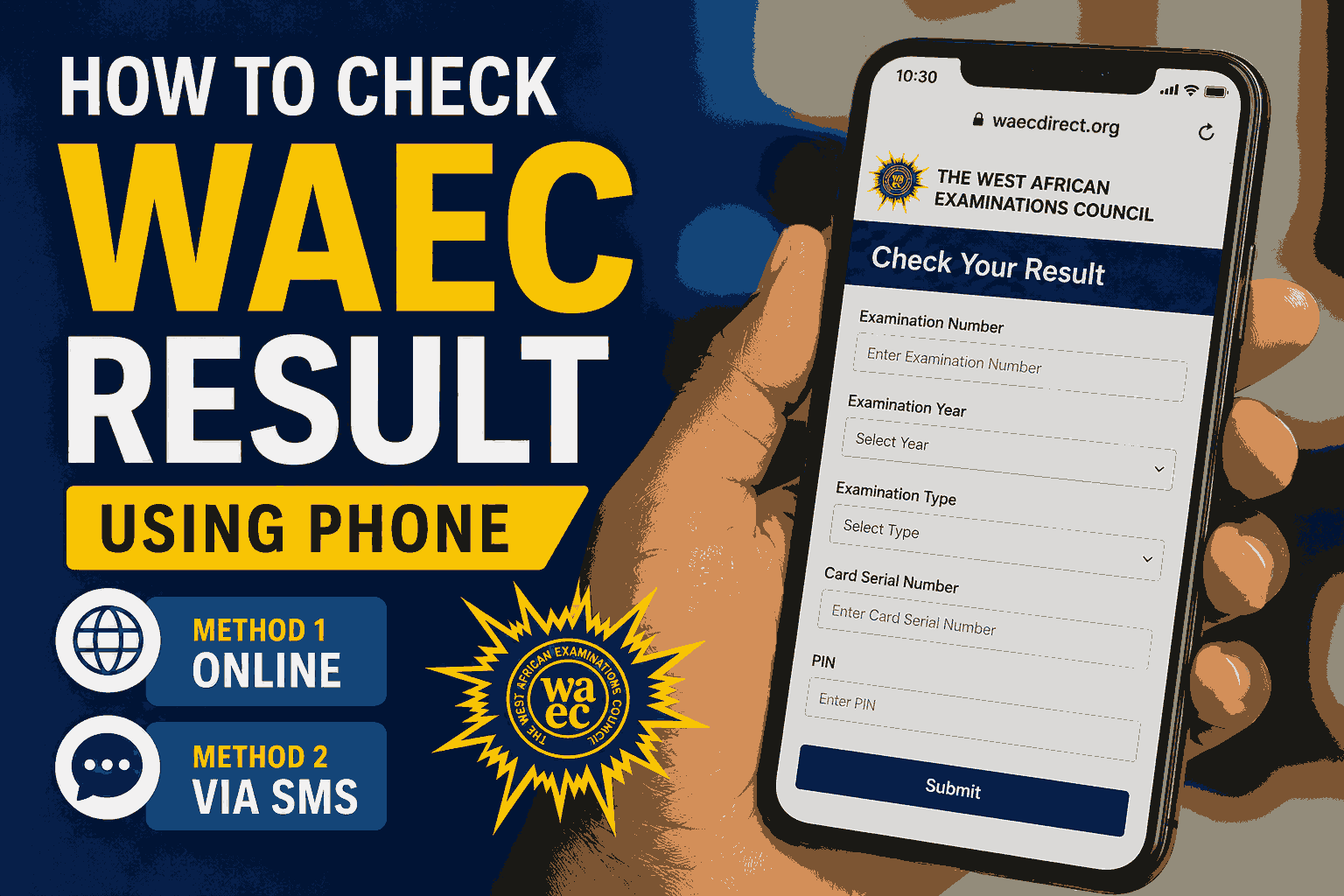
Checking your WAEC result has become easier than ever. If you are wondering how to check WAEC result using phone, you do not need a cyber café or a computer. With a smartphone or even a basic mobile phone, you can access your result within minutes. Whether you want to check your result online or through SMS, this comprehensive guide explains everything you need to know.
Many candidates search for how to check WAEC result using phone immediately after the West African Examinations Council releases results. Fortunately, WAEC provides multiple methods that allow candidates to view their results quickly and conveniently using their mobile devices. The official WAEC result portal is available through your phone browser, and there is also an SMS option for those without internet access.
What You Need Before Checking Your WAEC Result Using Phone
Before learning how to check WAEC result using phone, ensure you have the following:
WAEC Examination Number
Your examination number is required to access your result. This is usually your center number followed by your candidate number.
Examination Year
You must know the exact year you sat for the examination.
Examination Type
Examples include:
- WASSCE for School Candidates
- WASSCE for Private Candidates (GCE)
WAEC Result Checker PIN
You need a WAEC e-PIN or scratch card PIN to access your result online. WAEC uses this PIN as a security measure for result checking.
Method 1: How to Check WAEC Result Using Phone Online
This is the most popular method because it allows you to see your full result immediately.
Step 1: Open Your Phone Browser
Launch any browser on your phone, such as:
- Chrome
- Safari
- Firefox
- Opera Mini
Step 2: Visit the Official WAEC Result Portal
Go to:
WAEC Direct Result Checker Portal
This is the official platform for checking WAEC results online.
Step 3: Enter Your Examination Number
Input your complete WAEC examination number carefully.
Example:
4123456789
WAEC requires candidates to enter the full examination number without mistakes.
Step 4: Select Examination Year
Choose the year you sat for the examination from the dropdown menu.
Example:
2026
Step 5: Select Examination Type
Choose the correct examination category:
- School Candidate
- Private Candidate
Step 6: Enter Your e-PIN
Input the PIN obtained from your WAEC scratch card or e-PIN voucher.
Step 7: Enter the Serial Number
Type the serial number found on the scratch card or e-PIN voucher.
Step 8: Click Submit
After confirming all information is correct, click the Submit button.
Your result should appear within a few seconds.
Method 2: How to Check WAEC Result Using Phone Through SMS
If you do not have internet access, WAEC allows candidates to receive their results through SMS.
This method is particularly useful in areas with poor internet connectivity.
SMS Format
Type:
WAEC*ExamNo*PIN*ExamYear
Example:
WAEC*4250101001*123456789012*2026
Send the message to:
32327
After a few moments, your result will be delivered to your phone through SMS. WAEC advises candidates to follow the format exactly without spaces.
Supported Networks
The SMS service is available on major networks including:
- MTN
- Airtel
- Glo
A small SMS charge applies.
Benefits of Checking WAEC Result Using Phone
Understanding how to check WAEC result using phone offers several advantages.
Convenience
You can access your result from anywhere without visiting a cyber café.
Speed
Results can be checked within minutes after release.
Accessibility
Both smartphones and basic phones can be used.
Cost Effective
Checking via phone often costs less than visiting commercial centers.
Instant Access
You can save, screenshot, or print your result immediately.
Common Errors When Checking WAEC Result Using Phone
Many students encounter errors while trying to check their results.
Invalid Examination Number
Double-check that you entered the correct number.
Wrong Examination Year
Selecting the wrong year will prevent the system from locating your result.
Incorrect PIN
Ensure your e-PIN has not been entered incorrectly.
Exhausted PIN Usage
A WAEC result checker PIN can only be used a limited number of times. If the usage limit is reached, you may need another PIN.
Network Issues
Poor internet connection can interrupt the result checking process.
How to Buy a WAEC Result Checker PIN
To successfully learn how to check WAEC result using phone, you need a valid WAEC e-PIN.
You can obtain one through:
WAEC Offices
Authorized WAEC offices sell official result checker PINs.
Approved Vendors
Many accredited vendors offer WAEC e-PINs nationwide.
Online Purchase
Candidates can purchase e-PINs online from authorized channels.
Always purchase from trusted sources to avoid scams.
How to Save and Print Your WAEC Result After Checking
After successfully checking your result, take the following steps.
Take a Screenshot
Use your phone’s screenshot feature.
Save as PDF
Some browsers allow you to save the page as a PDF document.
Email It to Yourself
Sending a copy to your email creates a backup.
Print Later
You can print the saved PDF whenever necessary.
These steps ensure you do not lose access to your result.
What to Do If Your WAEC Result Is Not Showing
Sometimes candidates encounter issues even after entering the correct information.
Wait and Try Again
Heavy traffic on the WAEC portal can cause temporary delays.
Confirm Your Details
Check your examination number, year, and PIN carefully.
Contact WAEC Support
If the issue persists, contact WAEC support through the official portal. WAEC provides support contacts for candidates experiencing result-checking difficulties.
Visit a WAEC Office
For unresolved issues, a physical visit may be necessary.
Security Tips When Checking WAEC Result Using Phone
Since examination results are sensitive, follow these precautions.
Use Official Websites Only
Always use:
Avoid unofficial websites claiming to provide free results.
Protect Your PIN
Do not share your e-PIN with strangers.
Avoid Public Devices
Use your personal phone whenever possible.
Verify Website Security
Ensure the website uses HTTPS before entering your details.
Alternative Ways to Access WAEC Results
Apart from learning how to check WAEC result using phone, candidates may also use:
Computer Access
A laptop or desktop computer can access the same WAEC portal.
Result Verification Services
Institutions and employers may verify results through WAEC’s verification system.
This service is commonly used for admissions, employment, and international credential evaluations.
Frequently Asked Questions About How to Check WAEC Result Using Phone
Can I Check WAEC Result Using Phone Without Internet?
Yes. You can use the SMS method by sending the required format to 32327.
Do I Need a Scratch Card to Check My WAEC Result?
Yes. In most cases, you need a WAEC e-PIN or scratch card PIN to access your result online.
How Many Times Can I Use My WAEC PIN?
WAEC result checker PINs generally have a limited number of uses. Once exhausted, you may need a new PIN.
Also Read: 2026 WAEC Chemistry Practical Questions and Answers: Complete Exam Guide for Candidates
Conclusion
Knowing how to check WAEC result using phone is essential for every WAEC candidate. Whether you prefer checking online through the official WAEC portal or using the SMS option, the process is straightforward when you have your examination number, examination year, and valid e-PIN ready.
The safest and most reliable way remains the official WAEC portal, where you can instantly view, save, and print your results. By following the steps outlined in this guide, you can successfully check your WAEC result using your phone without stress.
Remember to use only official WAEC platforms, keep your PIN secure, and always verify your details before submitting them. With these precautions, checking your WAEC result becomes fast, secure, and hassle-free.












+ There are no comments
Add yours